
The connect page is your AI-era signup form
There's one moment where your customer decides your MCP is trustworthy: the connect screen. It deserves the same design attention as your signup page — because that's what it is now.
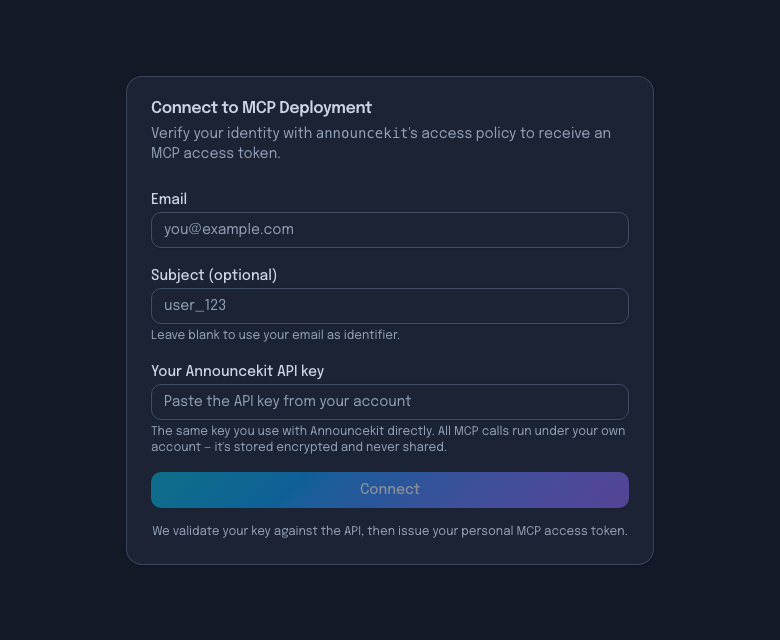
What actually happens (the four-RFC handshake)
- Client hits your MCP URL unauthenticated → 401 + protected-resource metadata (RFC 9728).
- Client fetches authorization-server metadata (RFC 8414) to find authorize/token endpoints.
- Client registers itself via Dynamic Client Registration (RFC 7591) — no pre-shared client IDs.
- Client opens the authorize URL — your connect screen — and completes PKCE (OAuth 2.1) for its token.
The magic for the customer: they pasted one URL, and the right screen just appeared. The magic for you: the "token" the AI client holds is a short-lived gateway session — the customer's real credential never leaves your vault.
Connect-page UX rules
- Brand it. Name + logo, or customers will (rightly) hesitate.
- Ask minimal. Email + the API key they already have. Every extra field costs activation.
- Say the privacy sentence. "Validated against the API, stored encrypted, never shared" — verbatim reassurance works.
- Validate live. Reject a bad key at connect time, not on the first tool call tomorrow.
- Keep the fallback. Raw URL + token for clients that don't do the OAuth dance.
Hosted and branded, out of the box
Every Command+K deployment ships this page — brandable, key-validating, with one-click Cursor install on the success screen. It's the flow verified against Claude, Cursor and ChatGPT. See MCP auth →
FAQ
- What happens when a customer adds an MCP URL to Claude?
- Claude sends an unauthenticated request, receives a 401 with protected-resource metadata (RFC 9728), fetches the authorization-server metadata (RFC 8414), registers itself via Dynamic Client Registration (RFC 7591), and opens the authorization URL — your hosted connect screen. After the customer authenticates, Claude exchanges the code (with PKCE) for a token and starts calling tools.
- Do customers need to copy-paste tokens to connect to an MCP server?
- Not if the server implements OAuth discovery. Token copy-paste is the fallback, not the flow: with discovery + DCR, the client opens the connect screen automatically and the customer never sees a token.
- What belongs on an MCP connect page?
- The product's name and logo (customers verify they're in the right place), the minimal credential ask (email + their existing API key, or an OAuth redirect), a clear privacy statement (validated against the API, stored encrypted, never shared), and a fallback path with the raw URL/token for exotic clients.